Compare
The app's built-in help for this screen, as shipped in quodeq 1.13.1. Edit this page on GitHub
The Compare tab ranks every project side by side. It appears in the sidebar once at least two projects have been evaluated; with fewer there is nothing to rank.
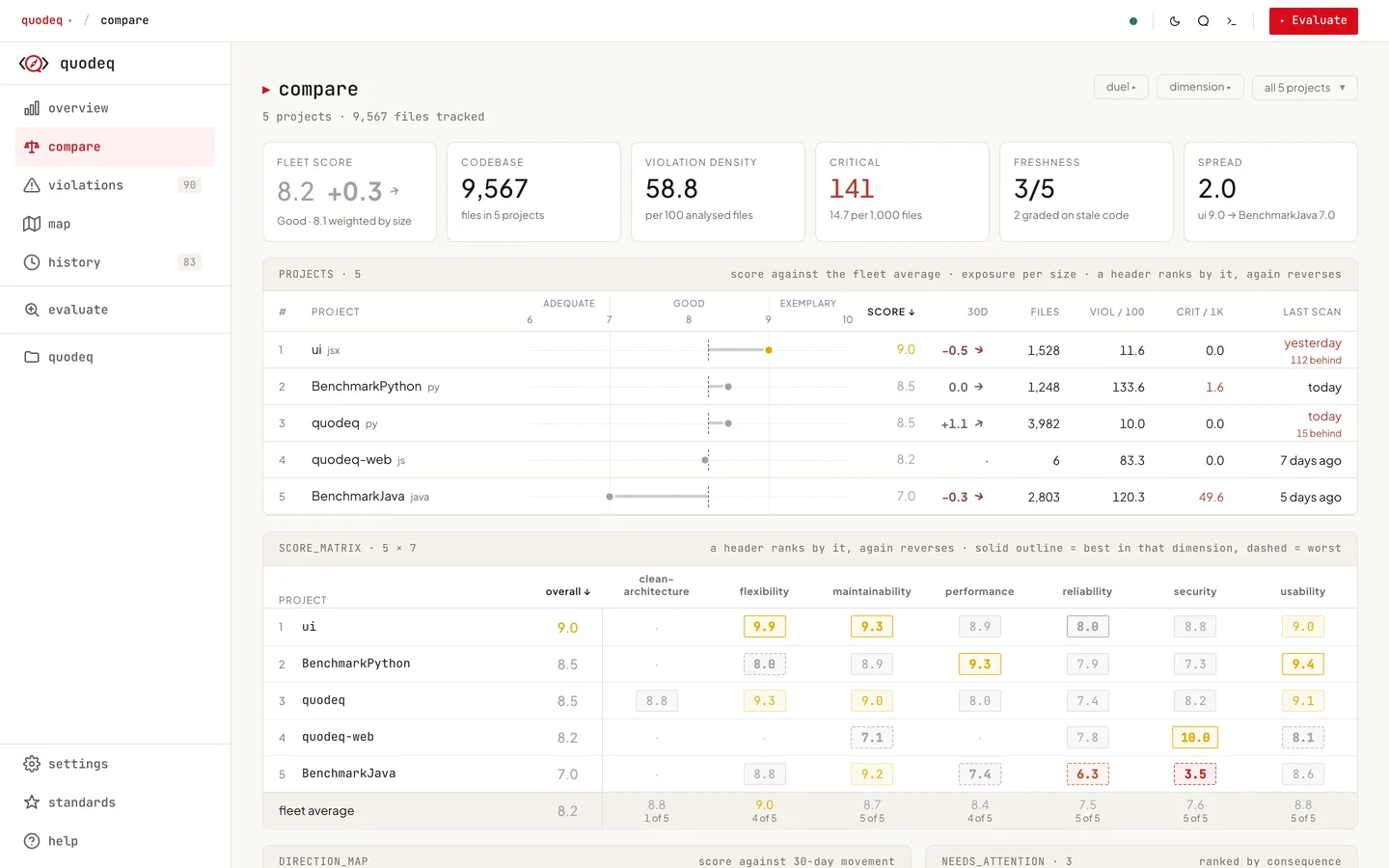
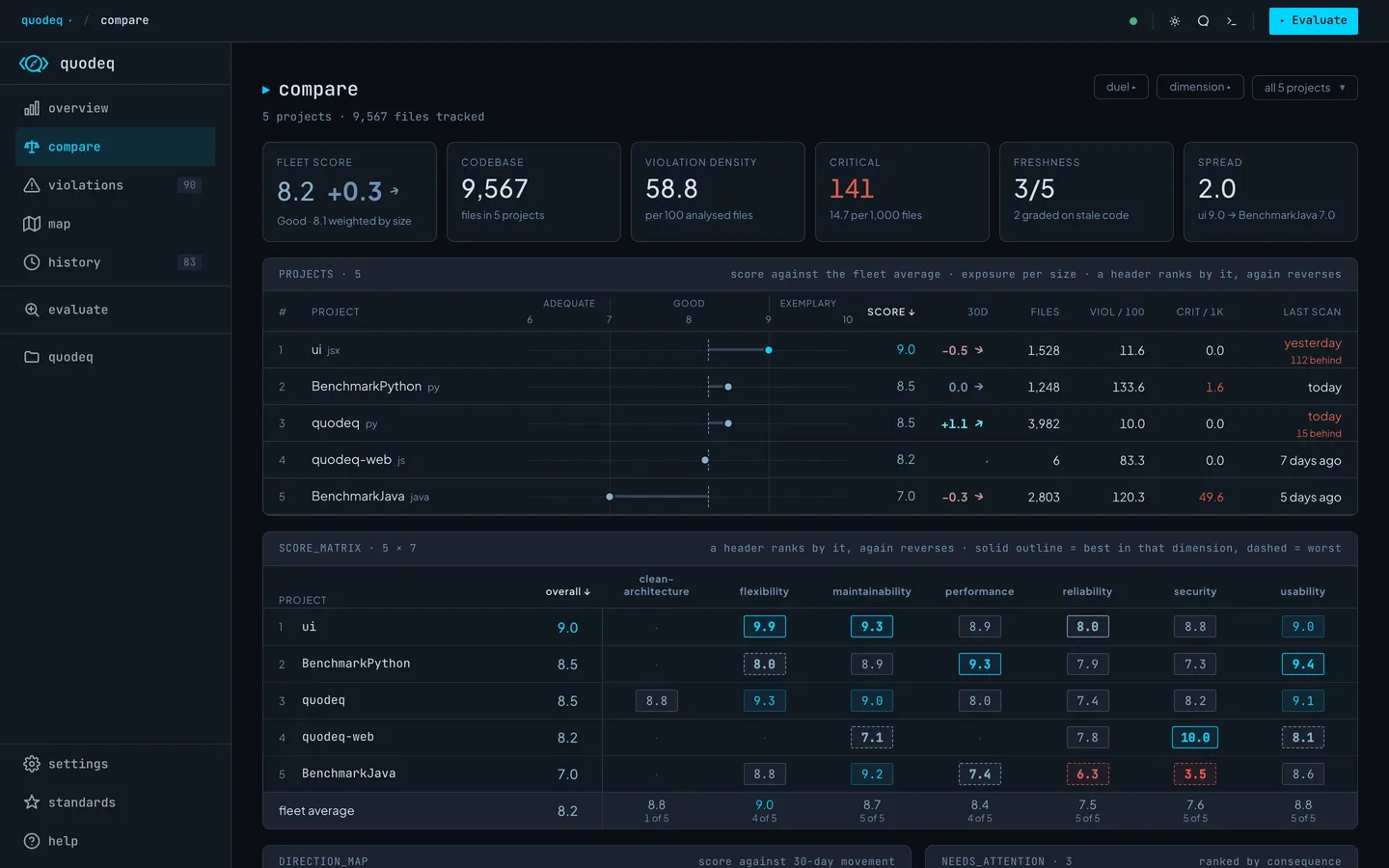
The header carries the screen's launchers: duel starts a head-to-head, dimension jumps into a dimension drill-down, the sort toggle flips best-first / worst-first, and the scope picker narrows the fleet.
Reading the fleet
- Stat cards the scope-wide picture: average score with its 30-day delta, violations by severity, compliance percentage, and the spread between the best and worst project.
- Needs attention the actionable summary, ranked by consequence: how bad a score is, weighted by project size and staleness. The strip leads with the top three; anything else that qualifies waits behind the more toggle, below a divider and slightly dimmed. Each card names the reason (weakest dimension, decline over 30 days, code moved since the scan, thin coverage) and links straight into the relevant dimension. The marker colour is the project's grade colour.
- Score matrix every score at a glance: one row per project, one column per dimension, each cell a chip in its grade colour. Per column the best score wears a solid border and the worst a dashed one. Clicking a column header ranks the fleet by that column (again to flip, a third time to restore); the rank numbers follow. A cell opens that project's own screen of that dimension; the project name opens the project. Columns that do not fit the panel distribute into stacked groups instead of scrolling.
- Dimensions board the scope average per dimension with its 30-day delta and violation count; a row opens the drill-down.
- Projects table one line per project: rank, score in its grade colour, the 30-day trend as a spark line with its delta, the violations total with the severity split, the compliance ratio, and the last evaluation with the commits-behind count. A dimmed delta means every run predates the 30-day window; it then shows the change at the last evaluation instead. Clicking the name opens the project. On narrow windows the columns shed by importance: the spark and ratio go first, then freshness, and the severity split folds into the bare total.
Staleness means the code moved
A grade is stale when commits landed after the run that produced it, not when the run is merely old. A 45-day-old grade with no commits since is current; a same-day grade with commits behind it is provisional. The commit count shows right in the row's last column. When the working copy can't be inspected (online projects, moved paths), an age check stands in.
The dimension drill-down
Open it from the header's dimension button, the dimensions board, or a score-matrix column: one dimension across the whole scope. The dimension tabs in the header switch sideways; the breadcrumb walks back.
- Needs attention dimension-scoped triage: principles where one project sits far under the rest, and hard 30-day drops.
- Principle matrix the score matrix again, one column per principle. Headers rank, and a cell opens that project's own principle page.
- Standings projects ranked on this dimension. Clicking a row opens that project's own screen of the same dimension; your selected project never changes.
- Radar overlays the leader, the trailer, and the scope average across the dimension's principles. Hovering a standings row draws that project's shape on top.
- Principle cards the scope average per principle with the leader and trailer named. The small bars follow the standings order and carry the standings rank, so the same slot is the same project in every card.
The principle page
Principle cards and matrix cells go one level deeper than the drill-down itself: clicking a bar, a cell, or the leader/trailer entry opens that project's own principle page, the same screen its explorer shows, violations and passing checks included. The jump is a detour, not a switch: your selected project stays what it was, and back pops straight to the drill-down. Actions taken there, like dismissing a violation, belong to the project being viewed, not the one selected in the sidebar.
The duel
The header's duel button picks the pair: the first click pins side A, the second opens the duel. When the scope holds exactly two projects it skips the picking and duels them directly. Remote projects duel like any others.
The board reads left versus right. Each side keeps one identity colour throughout, chosen away from the grade colours so a colour never reads as a judgement; scores themselves stay grade-coloured.
- The versus header both names (click one to open that project), each side's vitals, and the gap spelled out in plain words in the middle (leads by / dead even).
- DIMENSIONS every dimension either project scores, as mirrored bars meeting in the middle, with a gap tinted toward the winner. Gaps always read left minus right; a dimension only one side scores shows a dash instead.
- SHAPE both projects' radar on one grid across the shared dimensions.
- SCORE_TREND both score trends on one chart, one point per day (a day's newest run counts), with the 30-day delta window shaded.
- PRINCIPLE_DIFFS every principle difference, grouped by shared dimension; each group heading repeats the dimension's two scores and the gap, so a group reads without scrolling back up.
Scope and standards
The project picker narrows every number on the screen to a chosen subset; flagged selects only the projects currently needing attention. The whole screen follows the standards enabled on the Standards screen, the same visible set the Overview reads, so toggling a standard there re-renders Compare with the matching columns added or removed.
Remote projects
When a shared repository is connected, its published projects join the fleet as ordinary rows tagged remote. They rank, count toward the scope score, appear in the attention strip and matrices, and can duel local projects. A published project you also have locally is the same project, matched exactly as the Projects screen matches it, and your local copy prevails: one row, no remote duplicate. Only projects that exist solely in the shared repository appear as remote rows. Opening a remote row switches to its shared, read-only view; deep links into dimension and principle pages stay local-only, so a remote row's matrix cells open the shared project instead.